💳 Accounts tab
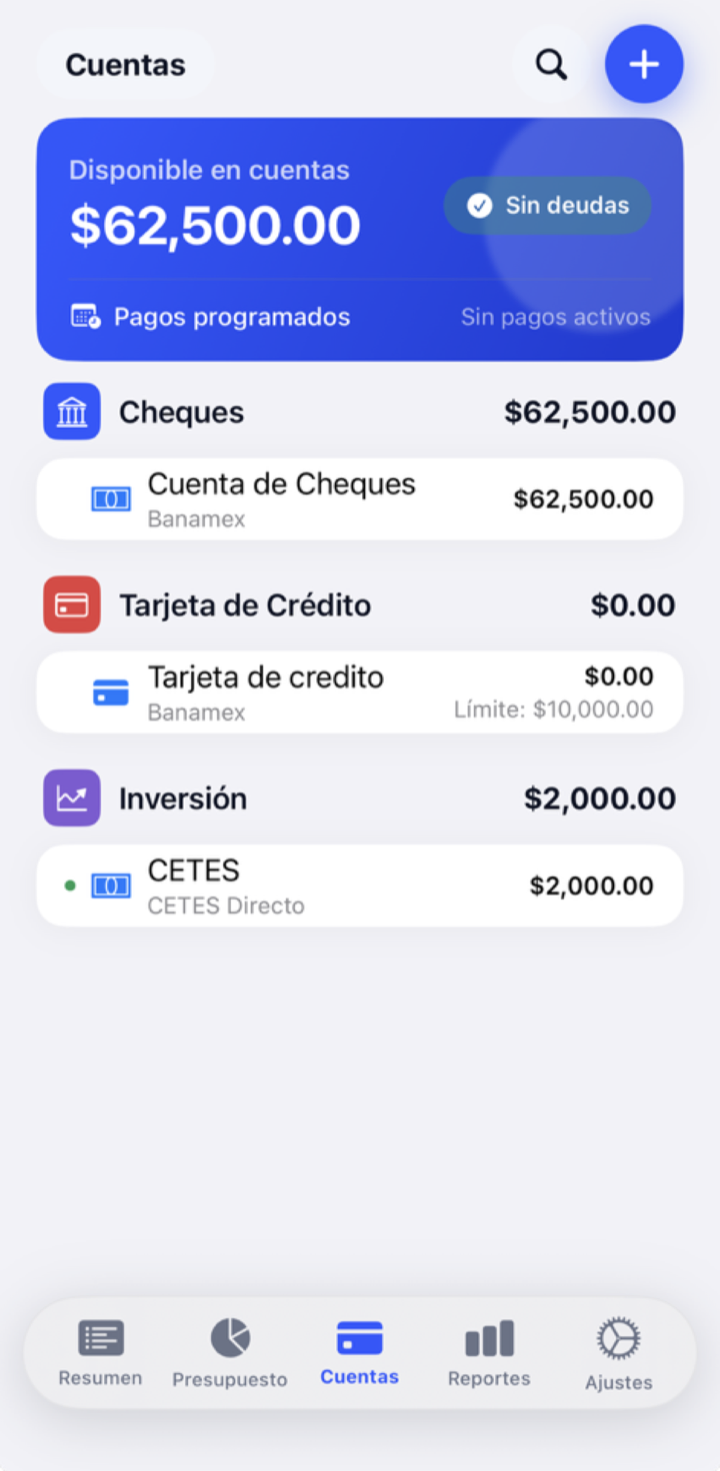
Accounts is where the real money lives: your checking, cash, savings, cards and investments. This is where you record every transaction and match them with your bank.
On this page
What is this screen for?
While Budget organizes your money into envelopes, Accounts keeps track of where that money physically is and of every transaction you make with it.
Account types
| Type | What it's for | Does it feed the budget? |
|---|---|---|
| Checking / Debit | Your everyday account | Yes (on budget) |
| Cash | The money in your wallet | Yes |
| Savings | Money set aside | Yes |
| Credit card | Purchases on credit | Yes (with its payment reserve) |
| Investment | Money that isn't for everyday spending | Can be off budget |
Spending accounts (checking, cash, savings) are on budget: their money is split into envelopes. An investment account can be marked off budget; then its balance does not count as "Unassigned" and doesn't go into the envelopes. Income into an off-budget account doesn't add to "Unassigned" either.
How to record a transaction
- Open the account and tap to add a transaction.
- Choose the type: expense, income or transfer between two accounts.
- Enter the amount. Remember the sign: negative = expense, positive = income.
- If it's an expense, choose the category (the envelope) it comes out of.
- Save. The account balance and the envelope's available amount update instantly.
Clearing and reconciling
They're two different, complementary things:
- Cleared — you mark that the transaction has already shown up at your bank (it's no longer pending).
- Reconcile — you match the app's balance with your bank's real balance at a given moment, and "lock in" that point as the truth.
They have their own step-by-step guide in Reconciliation.
What happens to your money
- Expense: lowers the account balance and lowers the chosen envelope's available amount.
- Income (into an on-budget account): raises the account balance and goes into "Unassigned", ready to split up.
- Transfer: moves money from one account to another; it doesn't touch your envelopes (except when paying a card, see below).
- Credit card payment: a transfer from your checking account to the card; it uses the reserve you had already set aside.
Tips and common mistakes
Record your expenses the same day. It takes ten seconds and it's what keeps your budget in touch with reality.
When entering an expense, don't forget to choose the category: a transaction without an envelope doesn't come out of anywhere and throws off your available amounts.
What if…?
What if I get money back from a purchase?
Record it as income in that same category: it raises the envelope's available amount without going through "Unassigned". That's the typical refund case.
What if the app's balance doesn't match my bank's?
Use reconciliation to find the difference and match them up. It's almost always a transaction you forgot to record or an amount entered wrong.
What if I pay with a credit card?
When you choose the expense's category, the app sets aside that money in your card's envelope for the future payment. All the details are in Credit cards.